Microsoft 365 Modern Authentication For Email (OAuth): Difference between revisions
Jump to navigation
Jump to search
(Created page with "Important: RangerMSP version 30 or above is required for configuring access to Microsoft 365 mail servers using OAuth. To configure RangerMSP to connect to Microsoft 365 mail...") |
(No difference)
|
Revision as of 13:35, 25 August 2022
Important: RangerMSP version 30 or above is required for configuring access to Microsoft 365 mail servers using OAuth.
To configure RangerMSP to connect to Microsoft 365 mail servers, follow the steps below:
- Run <Installation_DIR>\RangerMSP\Server\ServerConfig.exe.>
- Under the ‘Outgoing Mail Server’ tab, select the option ‘Use OAuth 2 to connect to Microsoft 365’.
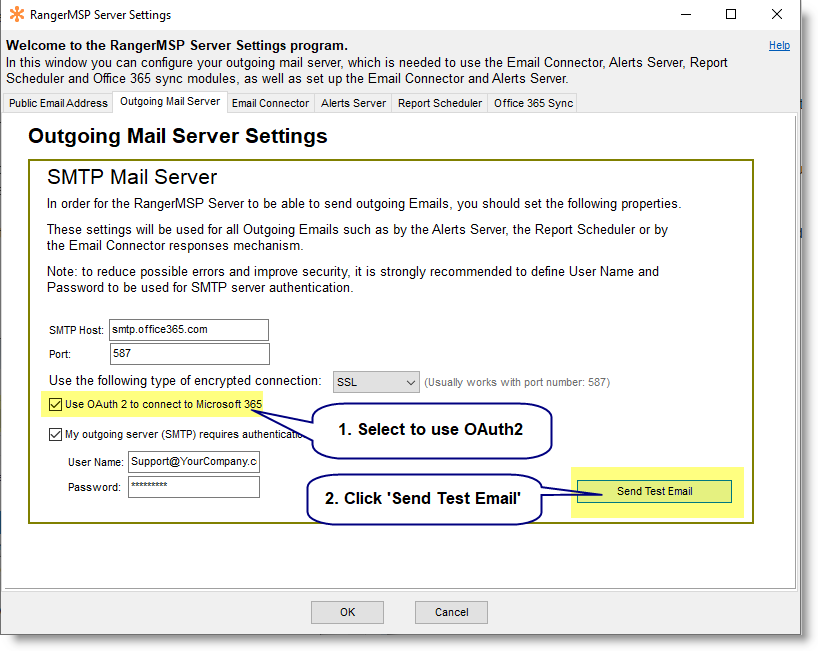
- You must authorize RangerMSP in Microsoft 365.
For this to work:- Click the ‘Send Test Email’ button.
- Specify the ‘To’ email address that will be used for sending the test email message.
- Click the ‘Send Test Email Now’ button:
Send_test_email_smtp.png
